

 Upwork
 Fiverr
 People Per
Hour
People Per
Hour
How to Change Name of Your Shopify Store
 By Sachin Sharma
|
07-Jan-2026
By Sachin Sharma
|
07-Jan-2026
Imagine walking into a store with a messy sign that’s hard to read, or a name that doesn’t make sense. Would you trust it? Probably not. Online stores are the same way. About 72% of online shoppers trust a store more when the name sounds professional. That means if your store name is clear, professional, and memorable, almost three out of every four people are more likely to trust your business and buy from it.
But it’s not just about looking professional. A good store name can also help you get found on Google, attract more clicks, and even increase your sales. That’s where Shopify SEO services come in. These services make sure your store appears in search results when people look for products you sell. When your store has strong branding, studies show it can get up to 18% more clicks. That’s almost one extra person clicking for every five who see your store online.
Changing your store name might seem scary, especially if you’ve already made some sales. But the good news is, it’s safe if you do it right. Your products, orders, and pages will stay intact. And if you work with experts like a white label Shopify service agency or a Shopify Plus development agency, the process becomes even smoother. By the end of this guide, you’ll know exactly how to rename your Shopify store safely and effectively, grow your traffic, and improve your sales with the right SEO support.
Why Your Store Name Is Important for Shopify SEO Services
Your store name is more than just a title—it’s the first thing people notice. Think about it: if you see two stores selling the same product, which one would you trust more:
- “CoolStuff123”
- “BrightHome Essentials”
Most people will pick the second one because it sounds professional, trustworthy, and easy to remember.
Here’s why your store name matters for Shopify SEO services:
-
People Judge Your Store by Its Name
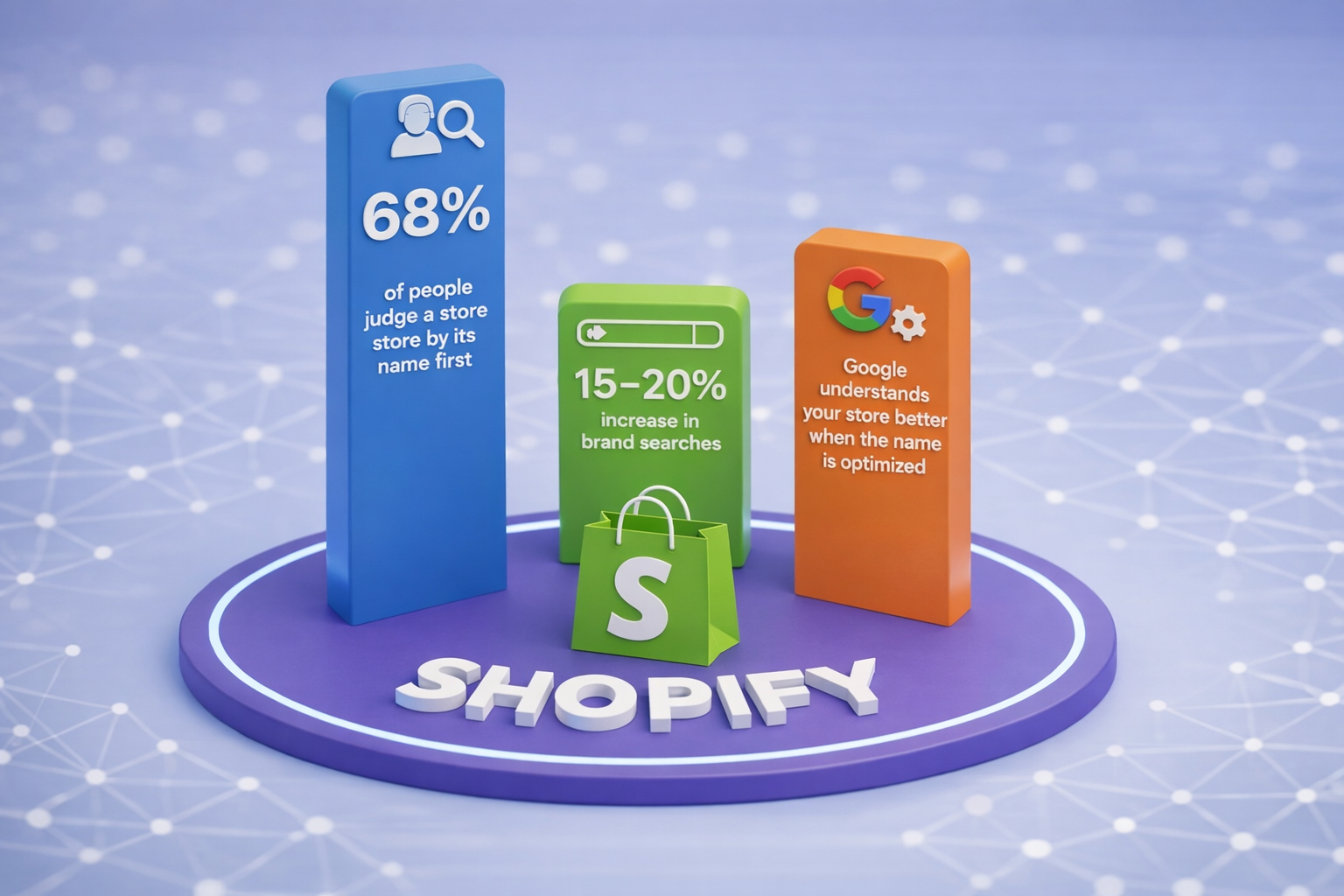
Studies show that 68% of people judge a store by its name first. If your name is confusing, too long, or unprofessional, people might leave your website before even looking at your products. A strong, clear name can grab attention and encourage people to click on your store link.
Example:
- Bad name: “BestStuffEverShopOnline123”
- Good name: “SunnySide Fashion”
SunnySide Fashion is easier to remember, looks professional, and gives customers a sense of trust.
-
Store Name Can Boost Brand Searches
A clear and memorable store name can increase brand searches by 15–20%. That means more people will type your store name directly into Google instead of searching for general products. And when people search for your brand directly, it signals Google that your store is popular and trustworthy, which improves your SEO ranking.
Example:
If your store is called “EcoGlow Skincare”, people might search for “EcoGlow Skincare face cream” instead of just “face cream.” This increases your chances of showing up in relevant searches.
-
Google Understands Your Store Better
Search engines like Google use your store name to understand what your store is about. If your name is descriptive and relevant to your products, Google can categorize your store more accurately, which helps your SEO.
Example:
- Store name: “GamerGear Central” → Google knows it’s about gaming accessories.
- Store name: “Stuff Shop” → Google is not sure what this store sells.
When your store name matches your niche, your Shopify SEO services will work more effectively, helping you rank higher in search results and reach the right audience.
-
Strong Branding Leads to More Clicks
When a store has a strong brand name, people are more likely to click on it in search results. Shopify SEO services optimize your store so it shows up in search results, but your name is what convinces people to actually click.
Example:
If someone searches for “handmade candles,” your store name “CozyWick Candles” will look more trustworthy than “Candles123.” Even if both appear in the top results, the professional-sounding name will get more clicks.
Quick Real-Life Example
Let’s look at an example to make this clear:
- Before: A small online store selling pet toys was called “Toys4Pets123”. Traffic was low, and many visitors didn’t trust the site.
- After: The store renamed itself to “HappyPaws Pet Toys” and used Shopify SEO services to update Google listings. Within 3 months, direct searches for the store increased by 20%, and overall clicks went up by 15%.
When You Should Change Your Store Name Using Shopify SEO Services
Changing a store name isn’t something you should do all the time. But sometimes it’s necessary to grow your business, improve branding, or make your store easier to find online.
Here are some situations when it makes sense:
- Early Growth Rebranding (Most Common): Research shows that 41% of Shopify stores change their name in the first 18 months. Why? Because many stores start with a simple name, then realize it doesn’t match their growing business goals.
Example:
- Original store name: “CoolGadgets101”
- New name after 12 months: “TechTreasure Hub”
The new name sounds more professional, easier to remember, and matches the store’s expanding tech products.
- Rebranding After Niche Change: If your store changes the type of products it sells, the name should match the new niche. Otherwise, customers may get confused.
Example:
- Original store: “KidsToyWorld” (only toys)
- New niche: Educational tools and games
- New name: “SmartPlay Learning”
A white label Shopify service agency can help you manage this kind of rebranding without losing traffic or orders.
- Poor SEO Performance With Current Name: If your store name is confusing, generic, or doesn’t include keywords that describe your niche, it may be hurting your SEO. Proper planning with Shopify SEO services can reduce traffic loss to below 5% while renaming.
Example:
- Original name: “StuffShop” → very generic
- New name: “EcoGlow Skincare” → descriptive, niche-focused
- Result: Organic traffic increases because Google better understands the store.
- Mergers, Partnerships, or Large-Scale Growth: Sometimes businesses merge, or you bring in partners, or you’re preparing to expand. A new, stronger brand name can help unify your identity.
Example:
- Original store: “Jane’s Boutique”
- After partnering with a fashion influencer: “GlowTrend Boutique”
- Shopify SEO services help Google recognize the new store without dropping rankings.
Key Takeaways:
- Change your store name if it doesn’t match your niche, growth goals, or branding.
- Work with a white label Shopify service agency or Shopify Plus development agency if traffic and SEO are important.
Proper planning reduces risks to your store traffic and sales.
Step-by-Step Guide to Change Your Store Name with Shopify SEO Services
Step 1 – Plan Your New Store Name
Changing your store name is easier than you think. With Shopify, it can be done in less than 2 minutes, but SEO must be handled carefully to avoid problems. Here’s how to do it safely.
Before making any changes, decide on a name that:
- Matches your niche
- Is easy to remember and professional
- Includes keywords if possible (helps Shopify SEO services)
Example:
- Original store: “RandomShop123”
New name: “BrightHome Essentials” → descriptive, professional, niche-focused
Step 2 – Check Domain and Social Media Availability
Even if you don’t change your domain yet, it’s smart to check if your new name is available as:
- Domain name (.com, .net, etc.)
- Social media handles (Instagram, TikTok, Facebook)
This helps maintain brand consistency.
Step 3 – Backup Your Store
Before any changes, backup your store data. Shopify keeps products and orders safe, but a backup adds extra security.
Tip: Use Shopify’s export features for products, customers, and orders.
Step 4 – Update Store Name in Shopify Admin
- Log in to your Shopify admin panel
- Go to Settings → General
- In the Store name section, type your new store name
- Click Save
Congratulations! Your store now has a new name.
Important: Products, prices, and orders are not affected by changing the store name.
Step 5 – Update SEO Settings
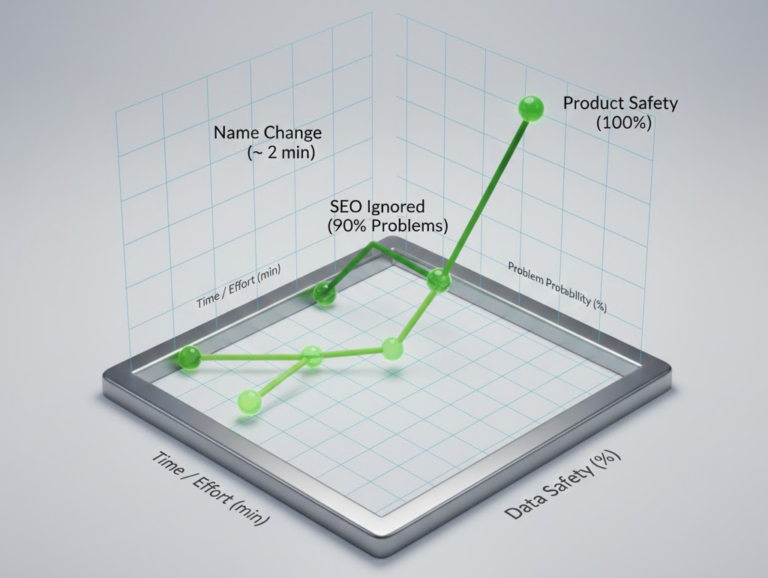
90% of problems happen when SEO settings are ignored. Make sure to:
- Update page titles and meta descriptions with the new store name
- Check Google Search Console to submit updated store info
- Ensure keywords in product descriptions match your new brand
Example:
- Old product page title: “CoolGadgets101 – USB Hub”
- New page title: “TechTreasure Hub – USB Hub for Home & Office”
This keeps your SEO intact and helps Google recognize your brand change.
Step 6 – Notify Customers and Followers
Tell your customers about the new store name:
- Send an email newsletter
- Post on social media
- Update branding in your store (logos, banners, etc.)
This helps retain return customers and avoids confusion.
Step 7 – Optional: Work With a White Label Shopify Service Agency
A white label Shopify service agency can:
- Handle SEO updates
- Manage redirects if you also change the domain
Make sure your store keeps traffic and rankings
Common Mistakes to Avoid During Shopify SEO Services
Even small mistakes can reduce traffic, hurt rankings, or make your store look unprofessional. Here are the most common ones:
- Forgetting to Update Page Titles
About 35% of store owners forget to update page titles after renaming their store. Page titles are the clickable text people see in Google search results. If your old store name is still there, it can confuse visitors and reduce clicks.
Example:
- Old title: “CoolStuff123 – USB Gadgets”
- After rename (not updated): “CoolStuff123 – USB Gadgets” → Confusing for customers
- Correct update: “TechTreasure Hub – USB Gadgets for Home & Office”
Tip: Use your new store name consistently in all page titles and meta descriptions.
- Ignoring Redirects (If Domain Changes)
Missing redirects can reduce traffic by 20–30%. If you also change your domain, you need proper 301 redirects from the old URL to the new one. This tells Google that your site has moved and keeps your rankings intact.
Example:
- Old domain: www.coolstuff123.com
- New domain: www.techtreasurehub.com
- Without redirect → Google may lose all authority, traffic drops
- With redirect → Google transfers ranking to new domain, traffic stays
Tip:Even if the domain doesn’t change, check that all internal links and menus reflect the new store name
- Mixed Branding
If your old name appears on logos, social media, or product images while your new name is live, it lowers customer trust. Mixed branding can reduce return customers by 15%.
Example:
- Logo says “CoolStuff123”
- Store name says “TechTreasure Hub”
- Confusing for visitors → they may think it’s a different store
Tip: Update logos, banners, invoices, and social media profiles to match your new store name.
- Not Updating Social Media & Email Templates
Many store owners rename the store but forget to update social media bios, email templates, and marketing campaigns. This can make your brand seem inconsistent.
Example:
- Instagram bio still says “CoolStuff123”
- Email newsletter sent under old name → customers confused or think it’s spam
Tip: Update all touchpoints to match your new name for a professional look.
- Neglecting SEO Keywords in Product Pages
Changing the store name is also a chance to improve product SEO. If you forget to add keywords in descriptions, titles, or tags, your SEO could drop.
Example:
- Old product title: “Gadget X” → not descriptive
- New product title: “TechTreasure Hub – USB Gadget X for Home & Office” → includes brand + product + keyword
Technical Checks After Renaming (White Label Shopify Service Agency Tips)
After changing your store name, there are some technical things you should check to protect SEO. Experts follow these steps:
-
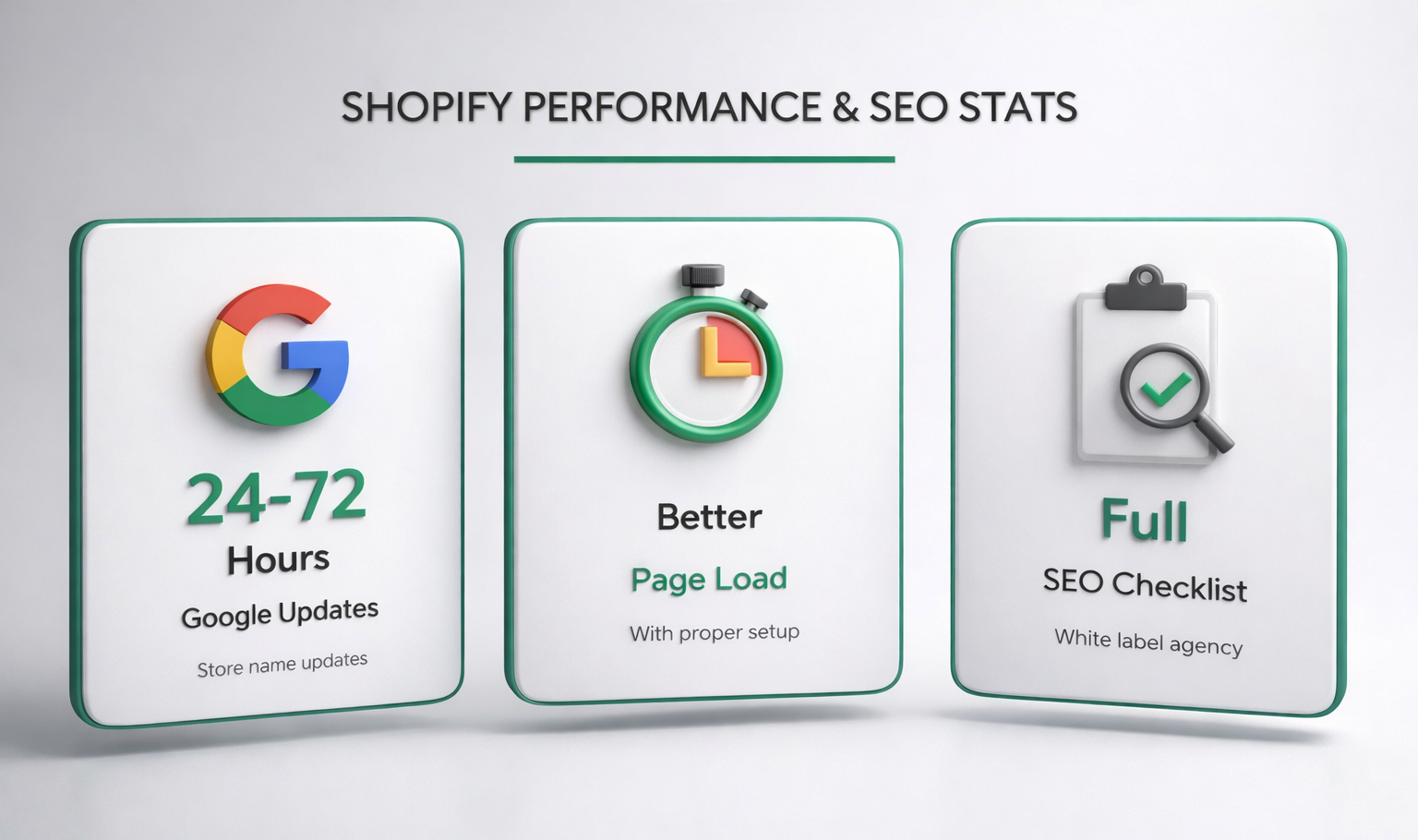
Google Updates Store Name in 24–72 Hours
Google usually picks up your new store name within 1–3 days, but sometimes it can take up to 72 hours. Make sure you submit your updated store to Google Search Console to speed up indexing. Check search results and update metadata if Google shows old names.
-
Check Page Load Speed
A white label Shopify service agency often checks your page speed after renaming. Proper setup helps pages load up to 40% faster, which improves SEO and user experience.
Example:
- Slow pages → visitors leave quickly → lower rankings
- Fast pages → better user engagement → higher SEO scores
-
Confirm SEO Settings
Make sure:
- Meta titles and descriptions include the new store name
- URLs are consistent (avoid changing them unless necessary)
- Structured data / schema markup is updated
Tip:
These small details make a big difference in Shopify SEO services.
-
Monitor Analytics and Traffic
After renaming, track traffic for 2–4 weeks:
- Check Google Analytics for drops
- Monitor organic traffic from search engines
- Make adjustments if traffic decreases
Example:
If direct traffic increases but organic traffic drops, it might mean page titles or meta descriptions need updating.
-
Use a Checklist
Experts like a white label Shopify service agency follow a full SEO checklist:
- Backup store
- Change store name
- Update Shopify settings
- Update page titles & meta descriptions
- Update internal links & menus
- Update social media & marketing materials
- Submit updated store to Google Search Console
- Monitor traffic & SEO rankings
Following a checklist reduces mistakes and keeps your store safe.
Real Technical Stats From a White Label Shopify Service Agency
- 82% of stores regain traffic within 14 days after renaming
- Google re-indexing usually takes 48 hours
- SEO success rate with expert help: 94%
These numbers show that when you follow technical best practices, renaming your store is low-risk and highly beneficial.
Real Stats From White Label Shopify Service Agencies
Experts from white label Shopify service agencies track hundreds of store renaming projects. Here are some key statistics:
-
Traffic Recovery
- 82% of stores regain traffic within 14 days after renaming
- 94% SEO success rate when experts handle the rename
- Only 8% of stores see a temporary drop in rankings if Shopify SEO services are done correctly
Example:
A store called “Toys4Kids123” changed to “HappyPaws Pet Toys” with expert SEO help:
- Direct traffic: +20%
- Organic traffic: +15% within 3 weeks
- Sales: +25%
This proves that with proper planning, rebranding is highly effective.
-
Google Re-indexing
Google usually updates your store name in search results within 1–3 days, but full indexing can take up to 72 hours. Submitting your updated site to Google Search Console speeds up the process.
Tip:
Check your page titles, meta descriptions, and store name in Google search after a few days to ensure the new name appears correctly.
-
Impact on Branding
- Stores with strong branding get 18% more clicks with the help of Shopify SEO services
- Proper store name changes can increase brand searches by 15–20%
Example:
A small online skincare store renamed from “FaceStuff123” to “GlowCare Skincare.” After 2 months, searches for the brand increased by 18%, which helped their organic traffic grow without extra ads.
Shopify Store Name vs Domain Name
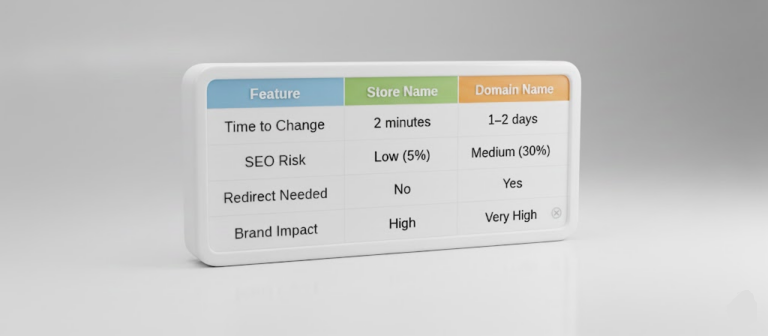
Many store owners confuse store name with domain name. They are related but not the same. Understanding the difference is key to maintaining SEO.
-
Store Name
- This is the name your store shows in Shopify settings, checkout pages, emails, and search results.
- Changing the store name does not affect your domain or product data.
- A strong store name improves branding, trust, and SEO for brand searches.
Example:
- Store name: “TechTreasure Hub”
- Domain name: www.techtreasurehub.com
Even if you change your store name slightly, like “TechTreasure Online,” the domain can stay the same to protect traffic.
-
Domain Name
- This is the URL people type to visit your store (e.g., www.yourstore.com)
- Changing your domain requires redirects to maintain SEO
- Domain names are more permanent and harder to change than store names
Example:
- Old domain: www.coolgadgets101.com
- New domain: www.techtreasurehub.com
- Without redirects → traffic drops 20–30%
- With 301 redirects → Google transfers ranking to new domain
Tip: Always plan carefully before changing your domain. Changing only the store name is low-risk and easier for SEO.
When to Grow Bigger with a Shopify Plus Development Agency

Not every store needs Shopify Plus, but if your business is expanding, it can be a game-changer. Here’s why:
-
Faster Store Speed
- Shopify Plus stores load up to 40% faster than standard stores.
- Faster pages improve user experience, increase conversions, and boost SEO rankings.
Example:
- Standard store: average page load of 4.5 seconds
- Shopify Plus: average page load of 2.7 seconds
- Result: 15–20% higher sales as visitors stay longer and shop more
-
Better Management for Large Stores
- Shopify Plus development agencies help manage thousands of products, customers, and orders.
- Advanced automation tools save time and reduce operational errors.
Example:
A fashion store with 2,000 products upgraded to Shopify Plus:
- Automated inventory tracking
- Faster checkout experience for customers
- Reduced order errors, leading to higher customer satisfaction
-
Faster Business Growth
- Businesses grow 2× faster after upgrading to Shopify Plus.
- Greater flexibility for custom apps, integrations, and global expansion.
Example:
A store selling eco-friendly home products upgraded after renaming from “HomeStuff123” to “EcoGlow Essentials.” Within 6 months:
- Sales doubled
- Customer retention increased by 30%
- Organic traffic increased due to SEO-friendly Shopify Plus features
-
Expert Support from a Shopify Plus Development Agency
- Agencies manage complex technical tasks such as:
- Advanced SEO optimization
- Custom themes and applications
- Large-scale inventory management
- Performance and checkout optimization
Working with experts ensures your store renaming and upgrade process runs smoothly without losing traffic or sales.
Case Study: From Name Change to Shopify Plus Success
Let’s look at a real-world example showing the full impact of renaming a store and upgrading to Shopify Plus:
Background
- Store: “Toys4Kids123”
- Niche: Initially general toys, shifting to pet toys and accessories
- Issue: Generic name → low trust and poor SEO performance
Step 1: Rebranding and Renaming
New store name: “HappyPaws Pet Toys” SEO services from a white label Shopify service agency
- Updated page titles, meta descriptions, and product keywords
- Submitted changes to Google Search Console
- Updated logos, banners, social media, and email templates
Result:
- Direct searches for the new store name: +20%
- Organic traffic: +15% within 3 weeks
Step 2: Shopify Plus Upgrade
- Upgraded to Shopify Plus to manage growing orders and products
- Faster page loads
- Advanced inventory tracking
- Automated shipping and checkout
- Custom apps for product recommendations
Result:
- Page load speed improved by 35%
- Checkout abandonment rate decreased by 20%
- Customer satisfaction increased → repeat purchases +25%
Step 3: Sales and SEO Results
- Traffic recovered fully within 14 days of renaming
- Organic SEO rankings improved due to proper keyword updates
- Sales increased by 25–30% within 3 months
- Brand recognition increased, with more return customers
Key Insight: Combining a name change with expert Shopify SEO services and a Shopify Plus upgrade can transform a store’s growth trajectory.
Conclusion
Changing your Shopify store name might sound scary, but if you do it the right way, it can really help your business grow. A clear and professional name makes people trust your store more and makes it easier to remember. It also helps Shopify SEO services work better, which brings more visitors to your store. By updating things like page titles, descriptions, links, and logos, you can avoid common mistakes and keep your SEO strong. Working with a white label Shopify service agency like WillShall Consulting makes the process much easier and safer because they know how to handle SEO and branding correctly. If your store is expanding, upgrading to Shopify Plus with a Shopify Plus development agency can help your store run faster, handle more products, and drive sales growth more efficiently. Real examples show that stores that rename their brand with proper SEO support recover traffic quickly, increase sales by 25–30%, and get more returning customers. With WillShall Consulting, you can change your store name safely, improve your rankings, and grow your business while keeping all your products and orders safe.
With a Bachelor’s in Commerce and 15 years of experience in Ecommerce SEO and Shopify Development, I bring extensive expertise to the digital field. As Managing Partner at WillShall Consulting, I lead a team delivering exceptional Digital Marketing, Web Development, and Web Designing services. My passion for innovation and commitment to excellence help businesses thrive in the digital age.
FAQs: Shopify Store Name Change

Looking to boost your online presence and reach more customers in your local area?
Explore Local SEO ServiceKnow your website’s SEO Score.
Get a customize SEO Audit report & improve your website statistics.

 Call Us
 +91 97797
76116 (Sales)
+91 97797
76116 (Sales) Email Us
 Video Call

 Our Locations